Formuler Z8 Pro Review: The Ultimate Specs and Price Guide for 2026
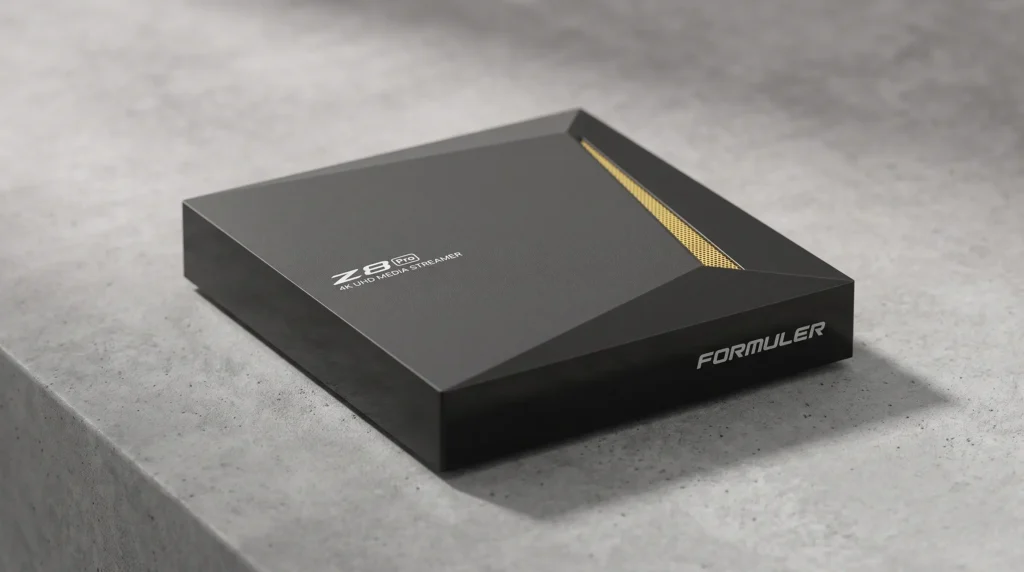
The cord-cutting revolution is in full swing, and having a reliable IPTV box is no longer just a luxury; it is a vital component of any modern home entertainment system. As streaming technologies evolve and ultra-high-definition broadcasts become the industry standard, consumers demand hardware that can keep pace. Among the myriad of options available on the market, the Formuler Z8 Pro has consistently been a topic of discussion. But how does this specific IPTV box hold up in 2026?
In this comprehensive guide, we will break down the hardware specifications, software capabilities, network performance, and current pricing of the Formuler Z8 Pro. Whether you are upgrading an older device or purchasing an IPTV box for the very first time to pair with the best USA IPTV service providers, this deep dive will provide all the necessary information to help you make an informed decision.
Table of Contents
1. Formuler Z8 Pro Review: The Evolution of the IPTV Box
Formuler has a long-standing reputation for manufacturing premium streaming devices. The original Formuler Z8 set a remarkably high standard in the industry, and the Z8 Pro was introduced to refine that experience. When you invest in a high-end IPTV box, you are essentially buying a dedicated micro-computer designed exclusively for video decoding and media playback.
In 2026, the streaming landscape includes newer models like the Formuler Z11 Pro Max. These newer iterations are incredibly powerful and cater to users who want a balance of heavy gaming alongside their media consumption. However, the Formuler Z8 Pro remains a highly sought-after IPTV box because it perfectly nails the fundamentals of live television streaming without forcing users to pay a premium for unnecessary gaming hardware. It is built strictly for the ultimate viewing experience.
2. Hardware and Core Specifications
The beating heart of any IPTV box is its processor and memory. A sluggish interface or delayed channel switching can ruin the viewing experience. Fortunately, the Formuler Z8 Pro is equipped with hardware specifically optimized for seamless media rendering.
Processor and Memory
- CPU (Central Processing Unit): The device is powered by a highly efficient Hisilicon Quad-core processor. This CPU is tailored for video playback, ensuring that the IPTV box does not overheat or stutter during prolonged use.
- RAM (Random Access Memory): It features 2GB of DDR4 RAM. DDR4 is significantly faster and more energy-efficient than the older DDR3 standard found in budget boxes. This memory allows the IPTV box to multitask, load electronic program guides (EPGs) quickly, and buffer live streams effectively.
- Storage: The unit comes with 16GB of eMMC internal storage. While 16GB might seem small compared to smartphones, it is more than enough for an IPTV box intended primarily for streaming applications, recording caches, and essential utility apps.
Design and Dimensions
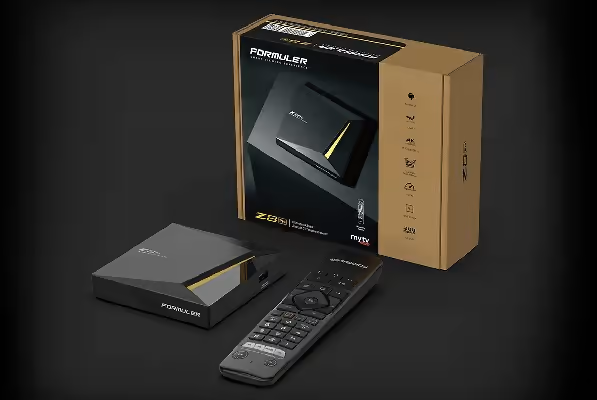
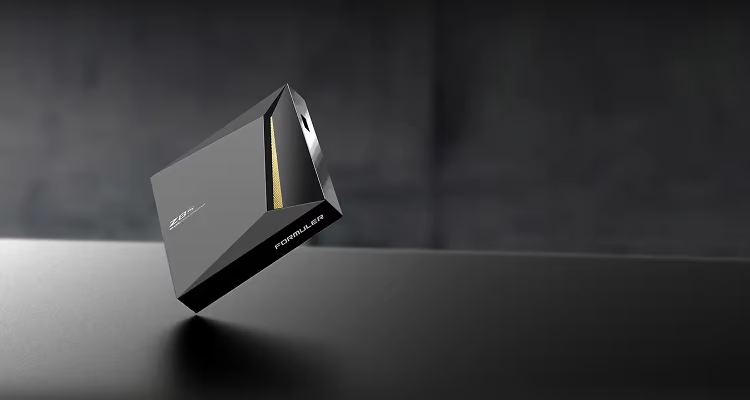
An IPTV box should blend seamlessly into your living room decor. The Z8 Pro features a sleek, minimalist black aesthetic, subtly accented to look premium.
- Dimensions: It is highly compact, measuring 105mm in length, 105mm in width, and 22mm in thickness.
- Antenna: When the external Wi-Fi antenna is installed, the total height reaches 121mm. This external antenna is a massive advantage over internal antennas found in cheaper devices, as it drastically improves signal reception.
3. Network Connectivity: The Key to a Buffer-Free IPTV Box
The absolute most critical aspect of any IPTV box is its ability to maintain a stable internet connection. High hardware specs mean nothing if the device cannot receive data packets consistently from your router. If you regularly need to fix IPTV buffering issues, upgrading your hardware is often the best solution.
Advanced Wi-Fi Capabilities
The Z8 Pro utilizes an upgraded 2.4G / 5.8G Dual-Band Dual-Antenna 2×2 MIMO configuration. MIMO (Multiple-Input Multiple-Output) technology allows the IPTV box to send and receive multiple data streams simultaneously. This drastically reduces wireless interference, cuts down on network latency, and helps prevent the dreaded buffering wheel during peak streaming hours. We highly recommend running a Speedtest on your network to ensure you are getting the bandwidth required for this dual-band system.
Gigabit Ethernet
For the ultimate, lag-free experience, a hardwired connection is always recommended. The Formuler Z8 Pro includes a Gigabit Ethernet port (10/100/1000M). Plugging an Ethernet cable directly from your router into this IPTV box guarantees maximum bandwidth and zero signal drop-offs, making it ideal for high-bitrate 4K sports broadcasts.
4. Software: MYTVOnline2 and Android Integration
What truly separates a Formuler IPTV box from generic Android TV hardware is the software ecosystem. While the device runs on a customized Android Operating System, the star of the show is Formuler’s proprietary viewing application.
The MYTVOnline2 Experience
The Z8 Pro features MYTVOnline2, a cutting-edge TV platform developed entirely by Formuler Technologies. Instead of forcing users to rely on clunky third-party interfaces, this IPTV box integrates your provider’s streams into a beautifully polished, cable-like interface.
- Grid EPG: MYTVOnline2 loads television guide data instantly, allowing you to scroll through days of programming seamlessly.
- Video on Demand (VOD): The VOD section organizes movies and TV series with high-quality box art, IMDb ratings, and intuitive categorization.
- Catch-Up TV: If supported by your provider, this IPTV box allows you to seamlessly rewind live TV or watch programs that aired days ago.
If you prefer to use external applications instead of MYTVOnline2, this device makes it incredibly easy to install IPTV Smarters Pro or other popular players directly from the Android marketplace.
Widevine L1 DRM Certification
A common issue with generic streaming hardware is the inability to play premium content in full resolution due to digital rights management (DRM) restrictions. The Formuler Z8 Pro includes embedded Widevine Level 1 (L1) and Level 3 (L3) DRM. According to the official Formuler documentation, this certification unlocks access to premium, Ultra High-Definition content from official streaming platforms. This makes it a highly versatile IPTV box for both third-party streams and official media apps.
5. Video Decoding and Display Quality
When you purchase a premium IPTV box, you expect exceptional picture quality. The Formuler Z8 Pro is a true 4K media player capable of supporting a vast array of media formats.
4K UHD and 60fps
This IPTV box supports an output resolution of 4K (3840 x 2160) at a buttery-smooth 60 frames per second (fps). Whether you are watching a cinematic movie release or fast-paced live sports, the image remains sharp, vibrant, and incredibly fluid.
Advanced Video Codecs
To stream 4K content efficiently without completely overwhelming your home internet bandwidth, an IPTV box must utilize advanced compression technologies. The Z8 Pro excels here by supporting the H.265 (HEVC) video decoder. High-Efficiency Video Coding (HEVC) compresses data files to nearly half the size of older formats without sacrificing any visual fidelity. The box also supports VP9, AVS, and H.264 (AVC, MVC).
HDR Compatibility
If you have a modern television, you will appreciate the High Dynamic Range (HDR) capabilities of this IPTV box. HDR provides a significantly wider range of colors, deeper, inkier blacks, and brighter whites, resulting in a more realistic and visually stunning image.
6. The Premium Remote Control and Usability
Interacting with your IPTV box should feel natural and intuitive. Formuler includes a premium Infrared (IR) Learning Remote Control with the Z8 Pro.
- Tactile and Ergonomic: The remote is designed to fit comfortably in the hand, with well-spaced, tactile buttons that prevent accidental clicks.
- IR Learning: You can program the remote to control your television’s basic functions (like power and volume), eliminating the need to juggle multiple remotes on your couch.
- Air Sync Remote Z App: In addition to the physical remote, this IPTV box supports the Air Sync Remote Z application. You can turn your smartphone or tablet into a fully functional remote control and even use it as a TV mirroring screen.
7. Ports, I/O, and Accessories
A versatile IPTV box should easily connect to your existing home theater peripherals. The Z8 Pro features a highly practical array of input and output ports:
| Port Type | Quantity | Purpose |
| USB 3.0 | 1 | High-speed data transfer, ideal for external hard drives and DVR recording. |
| USB 2.0 | 1 | Perfect for connecting wireless mouse/keyboard dongles or standard USB sticks. |
| HDMI 2.0a (CEC) | 1 | Delivers the 4K 60fps video and audio signals directly to your television. |
| Gigabit LAN | 1 | Hardwired Ethernet connection for maximum network stability. |
| IR Extension | 1 | Allows you to hide the IPTV box in a cabinet while still using the remote control. |
What is included in the box?
When you purchase the Z8 Pro, the package typically includes the main media receiver, the premium remote control, two AA batteries, an HDMI TV cable, a remote control extender, the dual-band antenna, a power adapter, and a quick setup guide.
8. Formuler Z8 Pro Price in 2026: Is It Worth It?
In 2026, the marketplace for streaming devices is incredibly competitive. Because Formuler has released subsequent models, the pricing for the Z8 Pro has adjusted, making it an incredibly attractive option for budget-conscious buyers who still demand premium quality from an IPTV box.
Current Market Pricing
- North American Market: Through various wholesalers and electronics retailers, an open-box or brand-new Z8 Pro can be found priced around $144.00 to $144.99 USD.
- European Market: For buyers in the EU, the device is typically priced around €127.00.
Value Proposition
When determining if this IPTV box is worth the investment in 2026, you must compare it to the current flagship models. Devices like the Formuler Z11 Pro Max cost significantly more. While the newer models boast slightly faster processors and more RAM, the Z8 Pro still utilizes the exact same MYTVOnline2 software environment that makes Formuler famous.
If your primary goal is simply to watch live television, movies, and series smoothly in 4K resolution, the Formuler Z8 Pro is a phenomenal purchase. You get the premium build quality, the incredible 2×2 MIMO Wi-Fi stability, and the unparalleled user interface of an elite IPTV box, all at a heavily reduced 2026 price point.
9. Formuler Z8 Pro Review: Our Final Verdict
As the streaming industry continues to push boundaries, finding a device that offers reliability, speed, and ease of use is paramount. The Formuler Z8 Pro has aged gracefully. It is a testament to the brand’s excellent engineering that a device released a few years ago still outperforms many of the brand-new, generic Android boxes flooding the market today.
Why You Should Buy This IPTV Box:
- MYTVOnline2: The proprietary software remains the absolute best way to consume live TV streams.
- Network Hardware: The Gigabit Ethernet and Dual-Band 2×2 MIMO Wi-Fi ensure that your streams will not buffer due to hardware bottlenecks.
- Cost Efficiency: You are acquiring top-tier Formuler technology at a highly accessible price point.
- Widevine L1: The DRM certification guarantees that your premium streaming services will play in glorious high definition without artificial software blocks.
In conclusion, the Formuler Z8 Pro is not just an older piece of tech; it is a refined, highly capable IPTV box that remains a smart, economical choice in 2026. Whether you are outfitting a primary home theater or adding a dedicated streaming device to a bedroom setup, this IPTV box delivers a masterclass in reliable, high-quality media consumption.
10. Comprehensive FAQ: Everything Else You Need to Know
To ensure this Formuler Z8 Pro review leaves no stone unturned, we have compiled a comprehensive list of the most frequently asked questions regarding this specific device. Whether you are troubleshooting a connection issue or trying to maximize your streaming setup in 2026, these answers will guide you.
Is the Formuler Z8 Pro still a good buy in 2026 compared to the Z11 Pro Max? Yes, it remains an exceptional purchase for cord-cutters. While newer models like the Z11 Pro Max offer slightly faster processing speeds and newer Android operating systems, the core experience remains incredibly similar because both rely heavily on the MYTVOnline ecosystem. As noted throughout this Formuler Z8 Pro review, if your primary goal is strictly watching live 4K television and VODs without heavy Android gaming, the Z8 Pro delivers identical visual quality at a much lower price point in 2026.
Can I install third-party apps like IPTV Smarters Pro on the Z8 Pro? Absolutely. Because the Formuler Z8 Pro runs on a customized Android 7 operating system, it allows you to download and install third-party applications. You are not locked exclusively into the MYTVOnline2 platform. If you prefer a different user interface, you can easily access the Google Play Store or use a downloader tool to install IPTV Smarters Pro, TiviMate, or any other preferred media player. The 2GB of DDR4 RAM is more than sufficient to run these alternative applications smoothly.
Why is my Formuler Z8 Pro buffering and how can I fix it? Buffering is rarely a hardware issue with the Z8 Pro, as its Hisilicon processor is highly capable. If you experience lag, it is almost always related to your local network or your Internet Service Provider (ISP). To fix IPTV buffering, first ensure you are utilizing the Gigabit Ethernet port for a direct wired connection. If you must use Wi-Fi, ensure the external antenna is screwed in tightly and that you are connected to the 5.8GHz band. Finally, restart your home router and clear the cache inside the MYTVOnline2 settings menu.
How does the Smart DVR and recording function work? One of the most highly praised features in our Formuler Z8 Pro review testing is the Smart Digital Video Recorder (DVR). To record live television, you simply need to plug a formatted USB flash drive or an external hard drive into the high-speed USB 3.0 port on the back of the device. Through the MYTVOnline2 Electronic Program Guide (EPG), you can click on any future program and schedule a recording. The device will automatically wake up, record the broadcast directly to your storage drive, and save it for offline viewing.
Can I use a VPN with the Formuler Z8 Pro? Yes, using a Virtual Private Network (VPN) is highly recommended when streaming. Many ISPs intentionally throttle video streaming bandwidth during peak evening hours, which can cause severe buffering. You can download top-rated VPN applications directly from the Google Play Store onto your Formuler device. Once active, the VPN runs quietly in the background, encrypting your data and masking your streaming activities from your ISP, ensuring you get the maximum speeds you pay for.
How do I program the IR Learning Remote to control my television? The premium remote included with the Z8 Pro features Infrared (IR) learning capabilities, meaning you can program it to turn your main television on and off, as well as control its volume. To do this, press and hold the “TV” button on the Formuler remote until the white LED light stays solidly lit. Then, point your original TV remote directly at the Formuler remote (head-to-head) and press the button you want to map (e.g., the power button). The Formuler remote will flash to confirm it has learned the signal. This eliminates the need for multiple remotes in your living room.
What does Widevine L1 certification actually mean for my streaming? Widevine is a Digital Rights Management (DRM) protection protocol used by major streaming platforms to prevent piracy. In a standard, uncertified Android box, you might be restricted to standard definition (480p or 720p) when trying to watch official premium platforms, regardless of how powerful the hardware is. Because the Formuler Z8 Pro possesses Widevine L1 certification, it has the official security clearance to decrypt and display premium, copyrighted streams in their full 4K Ultra High-Definition glory.
Is the Wi-Fi upgrade on the Z8 Pro really a noticeable improvement? If your router is located in the same room as your television, you might not notice a massive difference between the standard Z8 and the Z8 Pro. However, a major highlight of this Formuler Z8 Pro review is testing the box in challenging environments. The upgraded 2×2 MIMO (Multiple-Input Multiple-Output) technology drastically improves signal penetration through walls and floors. If your router is upstairs and your TV is in the basement, the Z8 Pro will maintain a much higher and more stable bitrate than older hardware.
How do I update the firmware and MYTVOnline2 software? Formuler is highly respected for supporting their devices with regular Over-The-Air (OTA) software updates long after their initial release. To update your box, navigate to the main Android home screen and open the “Software Update” application. The device will automatically ping Formuler’s servers and notify you if a new firmware patch or MYTVOnline2 update is available. Simply click “Download and Install,” and the box will reboot itself with the latest performance enhancements and security patches applied.
Does the Formuler Z8 Pro support Bluetooth connections? Yes, the device is equipped with Bluetooth 4.2 technology. This is incredibly useful for late-night viewing. You can easily pair your favorite wireless Bluetooth headphones or earbuds to the box, allowing you to watch loud, action-packed movies or sports broadcasts at full volume without waking up anyone else in the household. You can also use the Bluetooth functionality to connect wireless gaming controllers or external soundbars for an upgraded audio experience.