Editorial and legal notice: IPTV is a delivery technology. It can be used for licensed television, legitimate on-demand services, private business video, and authorized playlists. It can also be misused to distribute copyrighted content without permission. Before subscribing, confirm licensing, terms, refund rules, and local legal requirements. Prices, channel estimates, trials, and device support in this guide can change. Provider details should always be verified directly before payment.
Finding the best UK IPTV service providers is harder than comparing a few large channel numbers. A service may advertise tens of thousands of live streams yet perform poorly on the exact channels, devices, and evening hours that matter to you. Another provider may offer a smaller catalogue but deliver a cleaner programme guide, faster channel switching, clearer support, and more consistent playback. The right choice depends on your household, broadband connection, preferred screen, viewing schedule, and willingness to configure an IPTV player.
This guide compares 17 options using practical criteria: device compatibility, picture quality, EPG support, catalogue organization, trial availability, connection limits, pricing transparency, customer assistance, and the clarity of legal and refund information. Ultimate IPTV Hub is placed first because this version of the guide is prepared for UltimateIPTVHub.com and because the site offers clear plan guidance, installation resources, and direct support for popular devices. The remaining providers are included as alternatives based on the information supplied in the original comparison article. Their figures should be treated as provider-listed claims, not independently guaranteed measurements.
A good UK IPTV subscription should make setup understandable. You should know which app to install, whether the login arrives as Xtream Codes, an M3U link, or a portal URL, how many screens can connect at once, and what happens if the service does not work on your device. Ultimate IPTV Hub publishes a dedicated installation guide, a breakdown of IPTV channel categories, and a comparison of IPTV players for 2026. These pages help beginners understand the technical side before selecting a long plan.
Table of Contents
Quick answer: What is the best UK IPTV service in 2026?
For users who want plan guidance, broad device support, and help with setup, Ultimate IPTV Hub is the best overall starting point in this comparison. Its current site lists one-month, three-month, six-month, and twelve-month options, support for Firestick, Smart TV, Android, iOS, Windows, Mac, and MAG, plus HD, Full HD, and 4K categories where available. The correct plan still depends on your device, internet speed, number of screens, and the content categories you need.
For a huge advertised catalogue, PROXIPTV, OrigineTV, Subscription IPTV, and VEROXIPTV are positioned as high-volume choices. For multiple connections, SofaIPTV and IPTV Harmony deserve attention. For VOD-heavy viewing, OTTOcean and OrigineTV list especially large libraries. For users who prefer short commitments, Worthystream, VocoTV, and KROOZ TV advertise monthly plans. None of those strengths removes the need to verify licensing, regional access, payment protection, and refund terms.
Best UK IPTV service providers: quick comparison
| Rank | Provider | Best for | Advertised catalogue | Trial or guarantee | Starting listed price |
|---|---|---|---|---|---|
| 1 | Ultimate IPTV Hub | Guided setup and flexible plans | International live and VOD categories where available | Ask support for current test options | $9.99 monthly |
| 2 | PROXIPTV | Large UK-focused catalogue | 35,000+ live, 160,000+ VOD | 24-hour trial | £34.99 for 3 months |
| 3 | Stream in UK | British-first organization | 55,000+ live, 90,000+ VOD | No free trial listed | £25 for 3 months |
| 4 | Xtreme HD IPTV | Sports and multi-screen viewing | 20,000+ live | 36-hour trial | $45.99 for 3 months |
| 5 | MoaTV | International viewing | 7,000+ live, 40,000+ VOD | 3-day trial | $20 monthly |
| 6 | OrigineTV | European and VOD variety | 55,000+ live, 270,000+ VOD | 24-hour trial | €32.98 for 3 months |
| 7 | SofaIPTV | Flexible connection counts | 20,000+ live | 24-hour trial | $13 monthly |
| 8 | OneTvBox IPTV | Sports and no auto-renewal | 40,000+ live | Trial and guarantee listed | €22.99 for 3 months |
| 9 | Subscription IPTV | Annual plans | 45,000+ live, 200,000+ VOD | No test listed | €69 yearly |
| 10 | VEROXIPTV | Multiroom and travel | 38,500+ live, 200,000+ VOD | 24-hour trial | £26.99 for 3 months |
| 11 | Original IPTV Smarters | Device compatibility | 30,000+ live, 140,000+ VOD | 24-hour trial | $30 for 3 months |
| 12 | Worthystream | UK-focused short plans | 15,000+ live | 24-hour trial | $15 monthly |
| 13 | IPTV Harmony | Sports and custom playlists | 35,000+ live, 170,000+ VOD | 24-hour trial | €34.99 for 3 months |
| 14 | Velino TV | Server switching | 55,000+ live, 90,000+ VOD | Money-back period listed | $16 monthly |
| 15 | VocoTV | DVR and live events | 20,000+ live | 24-hour trial | $15 monthly |
| 16 | OTTOcean | Movies and series | 157,000+ movies, 29,000+ series | 24-hour trial | $15 monthly |
| 17 | KROOZ TV | Fast zapping and parental controls | 16,000+ live, 40,000+ VOD | 24-hour trial | $15 monthly |
The table is a screening tool, not a final verdict. Large numbers can include duplicates, regional variations, temporary streams, and categories that are not useful to your household. Ask for a trial or device check whenever possible. Test the provider on your real television, real internet connection, and normal viewing schedule.
How to choose among the best UK IPTV service providers
Start with legality and transparency. A professional provider should explain what it sells, publish terms and privacy information, identify support channels, and avoid promising permanent access to every premium event or copyrighted title. The UK Government defines illicit streaming as watching content without the copyright owner’s permission. Its guidance on illicit streaming devices is worth reading before paying an unfamiliar seller.
Next, check the device. Firestick users need an app that works smoothly with a remote. Smart TV users should confirm that the recommended player exists in their regional app store. Android TV users have more flexibility, but they should still install verified software and keep the system updated. Apple TV, iPhone, and iPad users may need different apps from Android households. MAG and Formuler devices can use portal-style logins, while Windows and Mac users often test an M3U link with VLC.
Connection limits are equally important. “Works on all devices” does not mean “works on all devices simultaneously.” A one-connection plan may allow installation on several screens but permit playback on only one at a time. Two televisions streaming together can trigger account restrictions when the plan includes one connection. Ask whether extra connections are independent, whether they share the same IP address, and whether mobile use outside the home is allowed.
Finally, test performance. Open live channels, VOD, catch-up, and the EPG. Change channels quickly. Leave one stream running for at least thirty minutes. Test at peak time. Check subtitles, audio tracks, search, favourites, parental controls, and resume playback. A service that passes this routine is more valuable than one with a spectacular sales page but unreliable everyday use.
Recommended 15-minute pre-purchase checklist
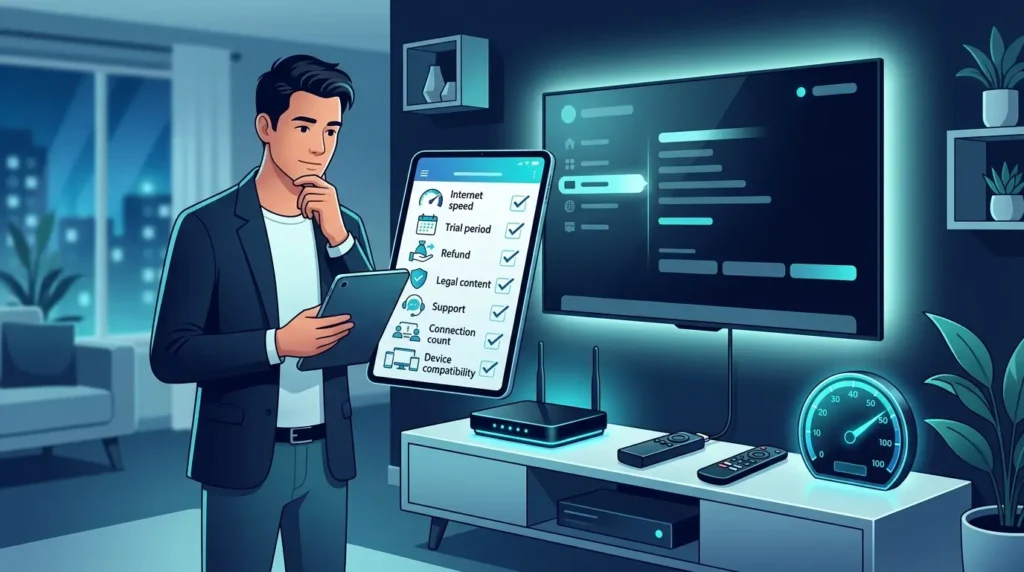
Before choosing any provider, write down your television model, streaming device, app preference, internet speed, country, and required number of screens. Ask support to confirm the login format, simultaneous connection limit, activation time, renewal method, refund conditions, and whether your preferred legal content categories are available. During a trial, open live television, a movie, a series episode, and the programme guide. Switch channels repeatedly, test search and favourites, verify audio and subtitles, and leave one stream playing long enough to expose instability. Repeat the test during your normal evening viewing time. Take screenshots of the offer, save your receipt, and keep the support conversation. This routine protects you from vague promises and helps you compare the best UK IPTV service providers using evidence from your device rather than marketing claims alone.
Important ranking note
This ranking is designed for comparison, not as a guarantee that one provider will be perfect for every home. Performance can differ by country, internet route, device, app, time of day, and selected content. Recheck every price and trial immediately before purchase. When two services appear similar, choose the one with clearer written terms, safer payment options, responsive support, and a successful test on your evening connection.
1. Ultimate IPTV Hub — Best overall for guided setup, flexible plans, and multi-device support
Ultimate IPTV Hub is presented as best overall for guided setup, flexible plans, and multi-device support. Its advertised catalogue includes international live TV categories where available, alongside movies, series, sports, news, and family categories where available. Picture options are listed as HD, Full HD, and 4K where available, and the service is described as compatible with Firestick, Smart TV, Android TV, iPhone, iPad, MAG, Windows, and Mac.
For UK viewers, the practical question is not simply how many channels appear in a sales headline. The better question is whether the service works reliably on your real device, during the hours you normally watch, with an interface you can navigate quickly.
Main features
The strongest reasons to compare Ultimate IPTV Hub are clear plan guidance, beginner-friendly installation help, broad device compatibility, support before and after setup, and simple pricing. These features cover the areas that usually affect daily satisfaction: how quickly a channel opens, how easy it is to find a programme, whether the guide stays synchronized, and whether the same login works on the devices already in your home. A high channel total is useful only when the lists are organised and the streams you actually care about are available.
Device compatibility deserves a separate check. Even when a provider supports many platforms, the experience can differ between Firestick, Samsung or LG Smart TV, Android TV, Apple devices, MAG boxes, and desktop players. Ask which app is recommended for your exact model, whether the provider uses Xtream Codes, M3U, or a portal login, and whether an app licence creates an additional cost. Related reading: Ultimate IPTV Installation Guide.
Pricing and trial
The listed price is $9.99 for 1 month, $24.99 for 3 months, $39.99 for 6 months, and $59.99 for 12 months. The current trial or guarantee information is: Ask support about trial or device-check options before ordering. Treat these details as a snapshot, not a permanent promise. Promotions, currency conversion, taxes, connection counts, and refund conditions can change without notice. Before paying, request a written summary of the plan duration, number of simultaneous screens, activation time, renewal method, and refund eligibility.
A trial should be used strategically. Test at the busiest time of day, open several channel categories, check EPG accuracy, switch quickly between streams, and play a long VOD title. If 4K matters, test genuine high-resolution content on a wired connection. Do not judge a service from a five-minute daytime test when your real use will happen during a crowded Saturday evening.
Advantages and limitations
Advantages: clear plan guidance, beginner-friendly installation help, broad device compatibility, support before and after setup, and simple pricing.
Limitations: content availability can vary by region and plan; one simultaneous connection is listed on standard plans; specific categories should be confirmed with support. These are not automatic deal-breakers, but they are questions to resolve before choosing a long subscription. Also confirm whether the provider holds the necessary rights for the content offered in your country. IPTV technology is legal, while unauthorized distribution of copyrighted content is not.
You can review the current plan information on the Ultimate IPTV Hub homepage and ask support to confirm device compatibility before ordering.
Overall, Ultimate IPTV Hub is most relevant for new users, households that value setup assistance, and viewers who want a clear route from plan selection to activation. It should not be selected only because of a headline channel count. Compare the trial terms, connection policy, app support, and current catalogue before committing.
2. PROXIPTV — Best for a large UK-focused live channel and VOD catalogue
PROXIPTV is presented as best for a large uk-focused live channel and vod catalogue. Its advertised catalogue includes 35,000+ live channels, alongside 160,000+ movies and series. Picture options are listed as HD, Full HD, and 4K options, and the service is described as compatible with Firestick, Android, iOS, Apple TV, Formuler, Windows, and other compatible players.
A large catalogue can look impressive, but day-to-day value comes from stable playback, accurate EPG data, sensible category organisation, and support that answers setup questions clearly.
Main features
The strongest reasons to compare PROXIPTV are broad channel catalogue, large on-demand library, sports and pay-per-view categories, catch-up options, and VPN-friendly setup. These features cover the areas that usually affect daily satisfaction: how quickly a channel opens, how easy it is to find a programme, whether the guide stays synchronized, and whether the same login works on the devices already in your home. A high channel total is useful only when the lists are organised and the streams you actually care about are available.
Device compatibility deserves a separate check. Even when a provider supports many platforms, the experience can differ between Firestick, Samsung or LG Smart TV, Android TV, Apple devices, MAG boxes, and desktop players. Ask which app is recommended for your exact model, whether the provider uses Xtream Codes, M3U, or a portal login, and whether an app licence creates an additional cost. Related reading: IPTV Channel Categories guide.
Pricing and trial
The listed price is £34.99 for 3 months, £49.99 for 6 months, and £69.99 for 12 months. The current trial or guarantee information is: 24-hour trial listed. Treat these details as a snapshot, not a permanent promise. Promotions, currency conversion, taxes, connection counts, and refund conditions can change without notice. Before paying, request a written summary of the plan duration, number of simultaneous screens, activation time, renewal method, and refund eligibility.
A trial should be used strategically. Test at the busiest time of day, open several channel categories, check EPG accuracy, switch quickly between streams, and play a long VOD title. If 4K matters, test genuine high-resolution content on a wired connection. Do not judge a service from a five-minute daytime test when your real use will happen during a crowded Saturday evening.
Advantages and limitations
Advantages: broad channel catalogue, large on-demand library, sports and pay-per-view categories, catch-up options, and VPN-friendly setup.
Limitations: the standard plan may allow only one connection; large catalogues can require careful filtering; trial and channel details should be reconfirmed. These are not automatic deal-breakers, but they are questions to resolve before choosing a long subscription. Also confirm whether the provider holds the necessary rights for the content offered in your country. IPTV technology is legal, while unauthorized distribution of copyrighted content is not.
Because provider pages and promotions change frequently, confirm the current offer on the provider’s official website rather than relying only on an older comparison table.
Choose PROXIPTV when your priority is viewers who want a very large catalogue and do not mind spending time organizing favourites. A short test on your home network is more informative than any marketing promise, especially for live events and 4K playback.
3. Stream in UK — Best for a British-first channel layout and quick activation
Stream in UK is presented as best for a british-first channel layout and quick activation. Its advertised catalogue includes 55,000+ live channels, alongside 90,000+ on-demand titles. Picture options are listed as HD and 4K where supported, and the service is described as compatible with Smart TV, Android box, Firestick, smartphones, tablets, and compatible players.
This option is worth considering when its strongest feature matches your viewing habits. Before paying for a long plan, confirm the exact device, connection count, trial rules, and content categories you need.
Main features
The strongest reasons to compare Stream in UK are UK-focused organization, large international selection, EPG and catch-up support, fast activation, and sports coverage. These features cover the areas that usually affect daily satisfaction: how quickly a channel opens, how easy it is to find a programme, whether the guide stays synchronized, and whether the same login works on the devices already in your home. A high channel total is useful only when the lists are organised and the streams you actually care about are available.
Device compatibility deserves a separate check. Even when a provider supports many platforms, the experience can differ between Firestick, Samsung or LG Smart TV, Android TV, Apple devices, MAG boxes, and desktop players. Ask which app is recommended for your exact model, whether the provider uses Xtream Codes, M3U, or a portal login, and whether an app licence creates an additional cost. Related reading: Best IPTV Players 2026 guide.
Pricing and trial
The listed price is £25 for 3 months, £35 for 6 months, £55 for 12 months plus promotional months, and £85 for 24 months plus promotional months. The current trial or guarantee information is: No free trial listed; a money-back period may be available. Treat these details as a snapshot, not a permanent promise. Promotions, currency conversion, taxes, connection counts, and refund conditions can change without notice. Before paying, request a written summary of the plan duration, number of simultaneous screens, activation time, renewal method, and refund eligibility.
A trial should be used strategically. Test at the busiest time of day, open several channel categories, check EPG accuracy, switch quickly between streams, and play a long VOD title. If 4K matters, test genuine high-resolution content on a wired connection. Do not judge a service from a five-minute daytime test when your real use will happen during a crowded Saturday evening.
Advantages and limitations
Advantages: UK-focused organization, large international selection, EPG and catch-up support, fast activation, and sports coverage.
Limitations: no standard free trial listed; support languages may be limited; promotional terms can change. These are not automatic deal-breakers, but they are questions to resolve before choosing a long subscription. Also confirm whether the provider holds the necessary rights for the content offered in your country. IPTV technology is legal, while unauthorized distribution of copyrighted content is not.
Because provider pages and promotions change frequently, confirm the current offer on the provider’s official website rather than relying only on an older comparison table.
Stream in UK can make sense for UK households that prefer a British-first interface and want a broad international backup catalogue. Read the refund rules, ask whether simultaneous connections are included, and save the support conversation before payment.
4. Xtreme HD IPTV — Best for multi-screen households and broad sports coverage
Xtreme HD IPTV is presented as best for multi-screen households and broad sports coverage. Its advertised catalogue includes 20,000+ live channels, alongside a frequently updated on-demand catalogue. Picture options are listed as HD, Full HD, and 4K, and the service is described as compatible with Smart TV, Firestick, Android boxes, iPhone, iPad, Windows, Mac, and laptops.
The service is positioned for users who want convenience rather than a complicated technical setup. As with every IPTV provider, advertised numbers should be treated as changing catalogue estimates rather than permanent guarantees.
Main features
The strongest reasons to compare Xtreme HD IPTV are broad sports categories, multi-device compatibility, EPG support, catch-up and recording features, and VPN compatibility. These features cover the areas that usually affect daily satisfaction: how quickly a channel opens, how easy it is to find a programme, whether the guide stays synchronized, and whether the same login works on the devices already in your home. A high channel total is useful only when the lists are organised and the streams you actually care about are available.
Device compatibility deserves a separate check. Even when a provider supports many platforms, the experience can differ between Firestick, Samsung or LG Smart TV, Android TV, Apple devices, MAG boxes, and desktop players. Ask which app is recommended for your exact model, whether the provider uses Xtream Codes, M3U, or a portal login, and whether an app licence creates an additional cost. Related reading: What Is IPTV guide.
Pricing and trial
The listed price is $45.99 for 3 months, $74.99 for 6 months, $140.99 for 12 months, with a higher-priced lifetime option listed. The current trial or guarantee information is: 36-hour trial listed. Treat these details as a snapshot, not a permanent promise. Promotions, currency conversion, taxes, connection counts, and refund conditions can change without notice. Before paying, request a written summary of the plan duration, number of simultaneous screens, activation time, renewal method, and refund eligibility.
A trial should be used strategically. Test at the busiest time of day, open several channel categories, check EPG accuracy, switch quickly between streams, and play a long VOD title. If 4K matters, test genuine high-resolution content on a wired connection. Do not judge a service from a five-minute daytime test when your real use will happen during a crowded Saturday evening.
Advantages and limitations
Advantages: broad sports categories, multi-device compatibility, EPG support, catch-up and recording features, and VPN compatibility.
Limitations: best performance requires stable broadband; multi-connection plans may cost more; the lifetime option is a major upfront commitment. These are not automatic deal-breakers, but they are questions to resolve before choosing a long subscription. Also confirm whether the provider holds the necessary rights for the content offered in your country. IPTV technology is legal, while unauthorized distribution of copyrighted content is not.
Because provider pages and promotions change frequently, confirm the current offer on the provider’s official website rather than relying only on an older comparison table.
The clearest reason to consider Xtreme HD IPTV is its fit for sports fans and households that need several compatible devices or simultaneous viewing options. Verify every critical detail directly because prices, trials, servers, and content groups can change.
5. MoaTV — Best for international channels and a simple global catalogue
MoaTV is presented as best for international channels and a simple global catalogue. Its advertised catalogue includes 7,000+ live channels, alongside 40,000+ movies and series. Picture options are listed as HD and 4K options, and the service is described as compatible with Android devices, Google TV, Fire TV, and Windows PC.
Its appeal comes from combining broad compatibility with a defined use case. The safest buying method is to test the provider on the same broadband connection and screen you will use after purchase.
Main features
The strongest reasons to compare MoaTV are international coverage, straightforward signup, organized content groups, VPN compatibility, and responsive support claims. These features cover the areas that usually affect daily satisfaction: how quickly a channel opens, how easy it is to find a programme, whether the guide stays synchronized, and whether the same login works on the devices already in your home. A high channel total is useful only when the lists are organised and the streams you actually care about are available.
Device compatibility deserves a separate check. Even when a provider supports many platforms, the experience can differ between Firestick, Samsung or LG Smart TV, Android TV, Apple devices, MAG boxes, and desktop players. Ask which app is recommended for your exact model, whether the provider uses Xtream Codes, M3U, or a portal login, and whether an app licence creates an additional cost. Related reading: Xtream Code setup guide.
Pricing and trial
The listed price is $20 for 1 month, $40 for 3 months, $50 for 6 months, $80 for 12 months, and $120 for 24 months. The current trial or guarantee information is: 3-day free trial listed. Treat these details as a snapshot, not a permanent promise. Promotions, currency conversion, taxes, connection counts, and refund conditions can change without notice. Before paying, request a written summary of the plan duration, number of simultaneous screens, activation time, renewal method, and refund eligibility.
A trial should be used strategically. Test at the busiest time of day, open several channel categories, check EPG accuracy, switch quickly between streams, and play a long VOD title. If 4K matters, test genuine high-resolution content on a wired connection. Do not judge a service from a five-minute daytime test when your real use will happen during a crowded Saturday evening.
Advantages and limitations
Advantages: international coverage, straightforward signup, organized content groups, VPN compatibility, and responsive support claims.
Limitations: crypto-only payment may be restrictive; the catalogue is smaller than some competitors; device support should be checked before purchase. These are not automatic deal-breakers, but they are questions to resolve before choosing a long subscription. Also confirm whether the provider holds the necessary rights for the content offered in your country. IPTV technology is legal, while unauthorized distribution of copyrighted content is not.
Because provider pages and promotions change frequently, confirm the current offer on the provider’s official website rather than relying only on an older comparison table.
Overall, MoaTV is most relevant for expatriates and multilingual households that value worldwide programming more than the largest possible channel count. It should not be selected only because of a headline channel count. Compare the trial terms, connection policy, app support, and current catalogue before committing.
6. OrigineTV — Best for European, UK, and US content variety
OrigineTV is presented as best for european, uk, and us content variety. Its advertised catalogue includes 55,000+ live channels, alongside 270,000+ on-demand titles. Picture options are listed as HD, Full HD, and 4K Ultra HD, and the service is described as compatible with Android, Fire TV, iOS, Smart TV, MAG, Enigma2, Formuler, and M3U-compatible apps.
For many households, support quality matters as much as picture quality. A service that explains installation, login formats, EPG refreshes, and connection limits can save hours of troubleshooting.
Main features
The strongest reasons to compare OrigineTV are very large VOD library, European market focus, sports and entertainment groups, wide device compatibility, and family-friendly options. These features cover the areas that usually affect daily satisfaction: how quickly a channel opens, how easy it is to find a programme, whether the guide stays synchronized, and whether the same login works on the devices already in your home. A high channel total is useful only when the lists are organised and the streams you actually care about are available.
Device compatibility deserves a separate check. Even when a provider supports many platforms, the experience can differ between Firestick, Samsung or LG Smart TV, Android TV, Apple devices, MAG boxes, and desktop players. Ask which app is recommended for your exact model, whether the provider uses Xtream Codes, M3U, or a portal login, and whether an app licence creates an additional cost. Related reading: Android TV installation guide.
Pricing and trial
The listed price is €32.98 for 3 months, €47.98 for 6 months, and €59.98 for 12 months. The current trial or guarantee information is: 24-hour trial listed. Treat these details as a snapshot, not a permanent promise. Promotions, currency conversion, taxes, connection counts, and refund conditions can change without notice. Before paying, request a written summary of the plan duration, number of simultaneous screens, activation time, renewal method, and refund eligibility.
A trial should be used strategically. Test at the busiest time of day, open several channel categories, check EPG accuracy, switch quickly between streams, and play a long VOD title. If 4K matters, test genuine high-resolution content on a wired connection. Do not judge a service from a five-minute daytime test when your real use will happen during a crowded Saturday evening.
Advantages and limitations
Advantages: very large VOD library, European market focus, sports and entertainment groups, wide device compatibility, and family-friendly options.
Limitations: 4K needs strong internet and compatible hardware; very large libraries can feel crowded; specific titles should never be assumed to remain available. These are not automatic deal-breakers, but they are questions to resolve before choosing a long subscription. Also confirm whether the provider holds the necessary rights for the content offered in your country. IPTV technology is legal, while unauthorized distribution of copyrighted content is not.
Because provider pages and promotions change frequently, confirm the current offer on the provider’s official website rather than relying only on an older comparison table.
Choose OrigineTV when your priority is European households that want language variety, a large VOD catalogue, and flexible device support. A short test on your home network is more informative than any marketing promise, especially for live events and 4K playback.
7. SofaIPTV — Best for flexible connection counts and worldwide streaming categories
SofaIPTV is presented as best for flexible connection counts and worldwide streaming categories. Its advertised catalogue includes 20,000+ live channels, alongside an updated movie and series catalogue. Picture options are listed as Full HD and 4K Ultra HD, and the service is described as compatible with Smart TV, Android TV, Apple TV, Firestick, MAG, mobile devices, Windows, and macOS.
The most useful comparison point is how the package fits your home: one screen or several, live sport or mostly VOD, short trial or annual plan, and simple apps or advanced playlist tools.
Main features
The strongest reasons to compare SofaIPTV are multiple connection choices, wide device support, anti-buffering features, several payment methods, and quick activation claims. These features cover the areas that usually affect daily satisfaction: how quickly a channel opens, how easy it is to find a programme, whether the guide stays synchronized, and whether the same login works on the devices already in your home. A high channel total is useful only when the lists are organised and the streams you actually care about are available.
Device compatibility deserves a separate check. Even when a provider supports many platforms, the experience can differ between Firestick, Samsung or LG Smart TV, Android TV, Apple devices, MAG boxes, and desktop players. Ask which app is recommended for your exact model, whether the provider uses Xtream Codes, M3U, or a portal login, and whether an app licence creates an additional cost. Related reading: IPTV versus cable comparison.
Pricing and trial
The listed price is from $13 for 1 month on one device, with higher tiers for two or three connections. The current trial or guarantee information is: 24-hour trial listed. Treat these details as a snapshot, not a permanent promise. Promotions, currency conversion, taxes, connection counts, and refund conditions can change without notice. Before paying, request a written summary of the plan duration, number of simultaneous screens, activation time, renewal method, and refund eligibility.
A trial should be used strategically. Test at the busiest time of day, open several channel categories, check EPG accuracy, switch quickly between streams, and play a long VOD title. If 4K matters, test genuine high-resolution content on a wired connection. Do not judge a service from a five-minute daytime test when your real use will happen during a crowded Saturday evening.
Advantages and limitations
Advantages: multiple connection choices, wide device support, anti-buffering features, several payment methods, and quick activation claims.
Limitations: 4K works best with at least a strong broadband connection; local network quality can affect playback; pricing rises with extra connections. These are not automatic deal-breakers, but they are questions to resolve before choosing a long subscription. Also confirm whether the provider holds the necessary rights for the content offered in your country. IPTV technology is legal, while unauthorized distribution of copyrighted content is not.
Because provider pages and promotions change frequently, confirm the current offer on the provider’s official website rather than relying only on an older comparison table.
SofaIPTV can make sense for families that want to choose one, two, or three simultaneous connections without changing platforms. Read the refund rules, ask whether simultaneous connections are included, and save the support conversation before payment.
8. OneTvBox IPTV — Best for sports, international entertainment, and no automatic renewal
OneTvBox IPTV is presented as best for sports, international entertainment, and no automatic renewal. Its advertised catalogue includes 40,000+ live channels, alongside a large library of movies, series, anime, and documentaries. Picture options are listed as HD and 4K Ultra HD, and the service is described as compatible with Smart TV, Firestick, Android, iOS, MAG, tablets, and laptops.
This provider belongs on the shortlist because it targets a clear audience rather than trying to be everything to everyone. Still, availability, licensing, and regional access should be checked directly.
Main features
The strongest reasons to compare OneTvBox IPTV are broad sports categories, no automatic renewal, EPG and catch-up features, secure payment options, and 24/7 WhatsApp support claims. These features cover the areas that usually affect daily satisfaction: how quickly a channel opens, how easy it is to find a programme, whether the guide stays synchronized, and whether the same login works on the devices already in your home. A high channel total is useful only when the lists are organised and the streams you actually care about are available.
Device compatibility deserves a separate check. Even when a provider supports many platforms, the experience can differ between Firestick, Samsung or LG Smart TV, Android TV, Apple devices, MAG boxes, and desktop players. Ask which app is recommended for your exact model, whether the provider uses Xtream Codes, M3U, or a portal login, and whether an app licence creates an additional cost. Related reading: IPTV support page.
Pricing and trial
The listed price is €22.99 for 3 months, €32.19 for 6 months, and €55.19 for 12 months. The current trial or guarantee information is: 24-hour trial and a longer money-back period listed. Treat these details as a snapshot, not a permanent promise. Promotions, currency conversion, taxes, connection counts, and refund conditions can change without notice. Before paying, request a written summary of the plan duration, number of simultaneous screens, activation time, renewal method, and refund eligibility.
A trial should be used strategically. Test at the busiest time of day, open several channel categories, check EPG accuracy, switch quickly between streams, and play a long VOD title. If 4K matters, test genuine high-resolution content on a wired connection. Do not judge a service from a five-minute daytime test when your real use will happen during a crowded Saturday evening.
Advantages and limitations
Advantages: broad sports categories, no automatic renewal, EPG and catch-up features, secure payment options, and 24/7 WhatsApp support claims.
Limitations: the trial may be more limited than some competitors; a stable connection is necessary for top quality; regional availability can change. These are not automatic deal-breakers, but they are questions to resolve before choosing a long subscription. Also confirm whether the provider holds the necessary rights for the content offered in your country. IPTV technology is legal, while unauthorized distribution of copyrighted content is not.
Because provider pages and promotions change frequently, confirm the current offer on the provider’s official website rather than relying only on an older comparison table.
The clearest reason to consider OneTvBox IPTV is its fit for viewers who dislike automatic billing and want a broad mix of sports and international entertainment. Verify every critical detail directly because prices, trials, servers, and content groups can change.
9. Subscription IPTV — Best for long-term plans and an all-in-one entertainment catalogue
Subscription IPTV is presented as best for long-term plans and an all-in-one entertainment catalogue. Its advertised catalogue includes 45,000+ live channels, alongside 200,000+ on-demand titles. Picture options are listed as HD, Full HD, UHD, and 4K where available, and the service is described as compatible with Smart TV, laptop, phone, Firestick, Android devices, and other compatible screens.
For UK viewers, the practical question is not simply how many channels appear in a sales headline. The better question is whether the service works reliably on your real device, during the hours you normally watch, with an interface you can navigate quickly.
Main features
The strongest reasons to compare Subscription IPTV are large channel and VOD catalogues, long-term plan choices, sports and PPV categories, multi-device support on selected plans, and WhatsApp and email support. These features cover the areas that usually affect daily satisfaction: how quickly a channel opens, how easy it is to find a programme, whether the guide stays synchronized, and whether the same login works on the devices already in your home. A high channel total is useful only when the lists are organised and the streams you actually care about are available.
Device compatibility deserves a separate check. Even when a provider supports many platforms, the experience can differ between Firestick, Samsung or LG Smart TV, Android TV, Apple devices, MAG boxes, and desktop players. Ask which app is recommended for your exact model, whether the provider uses Xtream Codes, M3U, or a portal login, and whether an app licence creates an additional cost. Related reading: Acceptable Use Policy.
Pricing and trial
The listed price is €69 for a one-year basic plan, €129 for a one-year premium plan, and €199 for a one-year platinum plan. The current trial or guarantee information is: No test period listed. Treat these details as a snapshot, not a permanent promise. Promotions, currency conversion, taxes, connection counts, and refund conditions can change without notice. Before paying, request a written summary of the plan duration, number of simultaneous screens, activation time, renewal method, and refund eligibility.
A trial should be used strategically. Test at the busiest time of day, open several channel categories, check EPG accuracy, switch quickly between streams, and play a long VOD title. If 4K matters, test genuine high-resolution content on a wired connection. Do not judge a service from a five-minute daytime test when your real use will happen during a crowded Saturday evening.
Advantages and limitations
Advantages: large channel and VOD catalogues, long-term plan choices, sports and PPV categories, multi-device support on selected plans, and WhatsApp and email support.
Limitations: no free trial listed; payment choices may be limited; long plans increase commitment before extended use. These are not automatic deal-breakers, but they are questions to resolve before choosing a long subscription. Also confirm whether the provider holds the necessary rights for the content offered in your country. IPTV technology is legal, while unauthorized distribution of copyrighted content is not.
Because provider pages and promotions change frequently, confirm the current offer on the provider’s official website rather than relying only on an older comparison table.
Overall, Subscription IPTV is most relevant for experienced IPTV users who already know their device setup and prefer annual packages. It should not be selected only because of a headline channel count. Compare the trial terms, connection policy, app support, and current catalogue before committing.
10. VEROXIPTV — Best for multiroom households and travellers
VEROXIPTV is presented as best for multiroom households and travellers. Its advertised catalogue includes 38,500+ live channels, alongside 200,000+ movies and shows. Picture options are listed as HD, Full HD, and 4K, and the service is described as compatible with Firestick, MAG, Smart TV, Android, iOS, desktop, and laptop.
A large catalogue can look impressive, but day-to-day value comes from stable playback, accurate EPG data, sensible category organisation, and support that answers setup questions clearly.
Main features
The strongest reasons to compare VEROXIPTV are multiroom support, large VOD catalogue, sports categories, wide geographic access claims, and VPN compatibility. These features cover the areas that usually affect daily satisfaction: how quickly a channel opens, how easy it is to find a programme, whether the guide stays synchronized, and whether the same login works on the devices already in your home. A high channel total is useful only when the lists are organised and the streams you actually care about are available.
Device compatibility deserves a separate check. Even when a provider supports many platforms, the experience can differ between Firestick, Samsung or LG Smart TV, Android TV, Apple devices, MAG boxes, and desktop players. Ask which app is recommended for your exact model, whether the provider uses Xtream Codes, M3U, or a portal login, and whether an app licence creates an additional cost. Related reading: Refund Policy.
Pricing and trial
The listed price is £26.99 for 3 months, £36.99 for 6 months, and £54.99 for 12 months. The current trial or guarantee information is: 24-hour trial listed. Treat these details as a snapshot, not a permanent promise. Promotions, currency conversion, taxes, connection counts, and refund conditions can change without notice. Before paying, request a written summary of the plan duration, number of simultaneous screens, activation time, renewal method, and refund eligibility.
A trial should be used strategically. Test at the busiest time of day, open several channel categories, check EPG accuracy, switch quickly between streams, and play a long VOD title. If 4K matters, test genuine high-resolution content on a wired connection. Do not judge a service from a five-minute daytime test when your real use will happen during a crowded Saturday evening.
Advantages and limitations
Advantages: multiroom support, large VOD catalogue, sports categories, wide geographic access claims, and VPN compatibility.
Limitations: payment options may be limited; quality depends on local internet conditions; multiroom terms should be confirmed. These are not automatic deal-breakers, but they are questions to resolve before choosing a long subscription. Also confirm whether the provider holds the necessary rights for the content offered in your country. IPTV technology is legal, while unauthorized distribution of copyrighted content is not.
Because provider pages and promotions change frequently, confirm the current offer on the provider’s official website rather than relying only on an older comparison table.
Choose VEROXIPTV when your priority is families that want separate rooms or travellers who need a compatible setup on different devices. A short test on your home network is more informative than any marketing promise, especially for live events and 4K playback.
11. Original IPTV Smarters — Best for broad compatibility and a familiar player-style experience
Original IPTV Smarters is presented as best for broad compatibility and a familiar player-style experience. Its advertised catalogue includes 30,000+ live channels, alongside 140,000+ movies and series. Picture options are listed as HD and 4K, and the service is described as compatible with Android TV boxes, smartphones, Firestick, Windows, Mac, iPhone, iPad, MAG, and Enigma2.
This option is worth considering when its strongest feature matches your viewing habits. Before paying for a long plan, confirm the exact device, connection count, trial rules, and content categories you need.
Main features
The strongest reasons to compare Original IPTV Smarters are broad device coverage, catch-up TV, EPG support, large international catalogue, and support through live chat and email. These features cover the areas that usually affect daily satisfaction: how quickly a channel opens, how easy it is to find a programme, whether the guide stays synchronized, and whether the same login works on the devices already in your home. A high channel total is useful only when the lists are organised and the streams you actually care about are available.
Device compatibility deserves a separate check. Even when a provider supports many platforms, the experience can differ between Firestick, Samsung or LG Smart TV, Android TV, Apple devices, MAG boxes, and desktop players. Ask which app is recommended for your exact model, whether the provider uses Xtream Codes, M3U, or a portal login, and whether an app licence creates an additional cost. Related reading: Ultimate IPTV Installation Guide.
Pricing and trial
The listed price is $30 for 3 months, $45 for 6 months, and $69 for 12 months. The current trial or guarantee information is: 24-hour trial listed. Treat these details as a snapshot, not a permanent promise. Promotions, currency conversion, taxes, connection counts, and refund conditions can change without notice. Before paying, request a written summary of the plan duration, number of simultaneous screens, activation time, renewal method, and refund eligibility.
A trial should be used strategically. Test at the busiest time of day, open several channel categories, check EPG accuracy, switch quickly between streams, and play a long VOD title. If 4K matters, test genuine high-resolution content on a wired connection. Do not judge a service from a five-minute daytime test when your real use will happen during a crowded Saturday evening.
Advantages and limitations
Advantages: broad device coverage, catch-up TV, EPG support, large international catalogue, and support through live chat and email.
Limitations: the brand name can be confused with independent player apps; some regional categories may be incomplete; users should verify the official provider identity. These are not automatic deal-breakers, but they are questions to resolve before choosing a long subscription. Also confirm whether the provider holds the necessary rights for the content offered in your country. IPTV technology is legal, while unauthorized distribution of copyrighted content is not.
Because provider pages and promotions change frequently, confirm the current offer on the provider’s official website rather than relying only on an older comparison table.
Original IPTV Smarters can make sense for users who want broad device compatibility and already understand playlist or player-based setup. Read the refund rules, ask whether simultaneous connections are included, and save the support conversation before payment.
12. Worthystream — Best for UK-focused viewing and straightforward short plans
Worthystream is presented as best for uk-focused viewing and straightforward short plans. Its advertised catalogue includes 15,000+ live channels, alongside a UK-focused on-demand catalogue. Picture options are listed as HD, Full HD, and 4K, and the service is described as compatible with Firestick, Android, iOS, Smart TV, Windows, and Mac.
The service is positioned for users who want convenience rather than a complicated technical setup. As with every IPTV provider, advertised numbers should be treated as changing catalogue estimates rather than permanent guarantees.
Main features
The strongest reasons to compare Worthystream are UK-oriented categories, football and sports groups, EPG and catch-up options, short subscription choices, and wide device support. These features cover the areas that usually affect daily satisfaction: how quickly a channel opens, how easy it is to find a programme, whether the guide stays synchronized, and whether the same login works on the devices already in your home. A high channel total is useful only when the lists are organised and the streams you actually care about are available.
Device compatibility deserves a separate check. Even when a provider supports many platforms, the experience can differ between Firestick, Samsung or LG Smart TV, Android TV, Apple devices, MAG boxes, and desktop players. Ask which app is recommended for your exact model, whether the provider uses Xtream Codes, M3U, or a portal login, and whether an app licence creates an additional cost. Related reading: IPTV Channel Categories guide.
Pricing and trial
The listed price is $15 for 1 month, $35 for 3 months, and $55 for 6 months. The current trial or guarantee information is: 24-hour trial listed. Treat these details as a snapshot, not a permanent promise. Promotions, currency conversion, taxes, connection counts, and refund conditions can change without notice. Before paying, request a written summary of the plan duration, number of simultaneous screens, activation time, renewal method, and refund eligibility.
A trial should be used strategically. Test at the busiest time of day, open several channel categories, check EPG accuracy, switch quickly between streams, and play a long VOD title. If 4K matters, test genuine high-resolution content on a wired connection. Do not judge a service from a five-minute daytime test when your real use will happen during a crowded Saturday evening.
Advantages and limitations
Advantages: UK-oriented categories, football and sports groups, EPG and catch-up options, short subscription choices, and wide device support.
Limitations: international breadth may be smaller than giant catalogues; no 12-month price is listed in the source article; availability of regional content should be checked. These are not automatic deal-breakers, but they are questions to resolve before choosing a long subscription. Also confirm whether the provider holds the necessary rights for the content offered in your country. IPTV technology is legal, while unauthorized distribution of copyrighted content is not.
Because provider pages and promotions change frequently, confirm the current offer on the provider’s official website rather than relying only on an older comparison table.
The clearest reason to consider Worthystream is its fit for UK viewers who want a simpler catalogue and prefer short commitments before renewing. Verify every critical detail directly because prices, trials, servers, and content groups can change.
13. IPTV Harmony — Best for sports, custom playlists, and two-screen standard access
IPTV Harmony is presented as best for sports, custom playlists, and two-screen standard access. Its advertised catalogue includes 35,000+ live channels, alongside 170,000+ on-demand titles. Picture options are listed as HD, UHD, and 4K, and the service is described as compatible with Firestick, Samsung Smart TV, Android devices, tablets, and M3U-compatible apps.
Its appeal comes from combining broad compatibility with a defined use case. The safest buying method is to test the provider on the same broadband connection and screen you will use after purchase.
Main features
The strongest reasons to compare IPTV Harmony are sports and PPV categories, custom playlists, catch-up options, two simultaneous streams on the listed standard plan, and WhatsApp and Telegram support claims. These features cover the areas that usually affect daily satisfaction: how quickly a channel opens, how easy it is to find a programme, whether the guide stays synchronized, and whether the same login works on the devices already in your home. A high channel total is useful only when the lists are organised and the streams you actually care about are available.
Device compatibility deserves a separate check. Even when a provider supports many platforms, the experience can differ between Firestick, Samsung or LG Smart TV, Android TV, Apple devices, MAG boxes, and desktop players. Ask which app is recommended for your exact model, whether the provider uses Xtream Codes, M3U, or a portal login, and whether an app licence creates an additional cost. Related reading: Best IPTV Players 2026 guide.
Pricing and trial
The listed price is €34.99 for 3 months, €48.99 for 6 months, and €64.99 for 12 months. The current trial or guarantee information is: 24-hour trial listed. Treat these details as a snapshot, not a permanent promise. Promotions, currency conversion, taxes, connection counts, and refund conditions can change without notice. Before paying, request a written summary of the plan duration, number of simultaneous screens, activation time, renewal method, and refund eligibility.
A trial should be used strategically. Test at the busiest time of day, open several channel categories, check EPG accuracy, switch quickly between streams, and play a long VOD title. If 4K matters, test genuine high-resolution content on a wired connection. Do not judge a service from a five-minute daytime test when your real use will happen during a crowded Saturday evening.
Advantages and limitations
Advantages: sports and PPV categories, custom playlists, catch-up options, two simultaneous streams on the listed standard plan, and WhatsApp and Telegram support claims.
Limitations: more devices may require an upgrade; VOD depth may vary by region; app compatibility should be checked in advance. These are not automatic deal-breakers, but they are questions to resolve before choosing a long subscription. Also confirm whether the provider holds the necessary rights for the content offered in your country. IPTV technology is legal, while unauthorized distribution of copyrighted content is not.
Because provider pages and promotions change frequently, confirm the current offer on the provider’s official website rather than relying only on an older comparison table.
Overall, IPTV Harmony is most relevant for sports-led households that want a clean favourites list and at least two screens. It should not be selected only because of a headline channel count. Compare the trial terms, connection policy, app support, and current catalogue before committing.
14. Velino TV — Best for server switching and a large combined catalogue
Velino TV is presented as best for server switching and a large combined catalogue. Its advertised catalogue includes 55,000+ live channels, alongside 90,000+ movies and series. Picture options are listed as SD, HD, Full HD, and 4K, and the service is described as compatible with Smart TV, Firestick, Android, iOS, and other compatible devices.
For many households, support quality matters as much as picture quality. A service that explains installation, login formats, EPG refreshes, and connection limits can save hours of troubleshooting.
Main features
The strongest reasons to compare Velino TV are free server switching, large live catalogue, EPG and time-shift features, multi-device support, and VPN-friendly setup. These features cover the areas that usually affect daily satisfaction: how quickly a channel opens, how easy it is to find a programme, whether the guide stays synchronized, and whether the same login works on the devices already in your home. A high channel total is useful only when the lists are organised and the streams you actually care about are available.
Device compatibility deserves a separate check. Even when a provider supports many platforms, the experience can differ between Firestick, Samsung or LG Smart TV, Android TV, Apple devices, MAG boxes, and desktop players. Ask which app is recommended for your exact model, whether the provider uses Xtream Codes, M3U, or a portal login, and whether an app licence creates an additional cost. Related reading: What Is IPTV guide.
Pricing and trial
The listed price is $16 for 1 month, $38 for 3 months, $49 for 6 months, and $65 for 12 months on one device. The current trial or guarantee information is: 24-hour money-back guarantee listed. Treat these details as a snapshot, not a permanent promise. Promotions, currency conversion, taxes, connection counts, and refund conditions can change without notice. Before paying, request a written summary of the plan duration, number of simultaneous screens, activation time, renewal method, and refund eligibility.
A trial should be used strategically. Test at the busiest time of day, open several channel categories, check EPG accuracy, switch quickly between streams, and play a long VOD title. If 4K matters, test genuine high-resolution content on a wired connection. Do not judge a service from a five-minute daytime test when your real use will happen during a crowded Saturday evening.
Advantages and limitations
Advantages: free server switching, large live catalogue, EPG and time-shift features, multi-device support, and VPN-friendly setup.
Limitations: a stable high-speed connection is important; connection upgrades may change pricing; money-back terms should be read carefully. These are not automatic deal-breakers, but they are questions to resolve before choosing a long subscription. Also confirm whether the provider holds the necessary rights for the content offered in your country. IPTV technology is legal, while unauthorized distribution of copyrighted content is not.
Because provider pages and promotions change frequently, confirm the current offer on the provider’s official website rather than relying only on an older comparison table.
Choose Velino TV when your priority is viewers who value server flexibility and want both a broad channel lineup and a substantial VOD library. A short test on your home network is more informative than any marketing promise, especially for live events and 4K playback.
15. VocoTV — Best for cloud DVR and flexible live-event viewing
VocoTV is presented as best for cloud dvr and flexible live-event viewing. Its advertised catalogue includes 20,000+ live channels, alongside live and on-demand entertainment categories. Picture options are listed as HD, Full HD, and 4K, and the service is described as compatible with Smart TV, Firestick, Android, iOS, and web browsers.
The most useful comparison point is how the package fits your home: one screen or several, live sport or mostly VOD, short trial or annual plan, and simple apps or advanced playlist tools.
Main features
The strongest reasons to compare VocoTV are cloud DVR claims, PPV and sports categories, geo-unblocking compatibility, multi-device support, and live and on-demand options. These features cover the areas that usually affect daily satisfaction: how quickly a channel opens, how easy it is to find a programme, whether the guide stays synchronized, and whether the same login works on the devices already in your home. A high channel total is useful only when the lists are organised and the streams you actually care about are available.
Device compatibility deserves a separate check. Even when a provider supports many platforms, the experience can differ between Firestick, Samsung or LG Smart TV, Android TV, Apple devices, MAG boxes, and desktop players. Ask which app is recommended for your exact model, whether the provider uses Xtream Codes, M3U, or a portal login, and whether an app licence creates an additional cost. Related reading: Xtream Code setup guide.
Pricing and trial
The listed price is $15 for 1 month, $40 for 3 months, and $60 for 6 months. The current trial or guarantee information is: 24-hour trial listed. Treat these details as a snapshot, not a permanent promise. Promotions, currency conversion, taxes, connection counts, and refund conditions can change without notice. Before paying, request a written summary of the plan duration, number of simultaneous screens, activation time, renewal method, and refund eligibility.
A trial should be used strategically. Test at the busiest time of day, open several channel categories, check EPG accuracy, switch quickly between streams, and play a long VOD title. If 4K matters, test genuine high-resolution content on a wired connection. Do not judge a service from a five-minute daytime test when your real use will happen during a crowded Saturday evening.
Advantages and limitations
Advantages: cloud DVR claims, PPV and sports categories, geo-unblocking compatibility, multi-device support, and live and on-demand options.
Limitations: cancellation may be less straightforward; older mobile devices may feel slower; recording limits should be confirmed. These are not automatic deal-breakers, but they are questions to resolve before choosing a long subscription. Also confirm whether the provider holds the necessary rights for the content offered in your country. IPTV technology is legal, while unauthorized distribution of copyrighted content is not.
Because provider pages and promotions change frequently, confirm the current offer on the provider’s official website rather than relying only on an older comparison table.
VocoTV can make sense for viewers who often miss live programmes and want recording or scheduling features. Read the refund rules, ask whether simultaneous connections are included, and save the support conversation before payment.
16. OTTOcean — Best for a very large movie and series library
OTTOcean is presented as best for a very large movie and series library. Its advertised catalogue includes international live channel categories, alongside 157,000+ movies and 29,000+ TV series. Picture options are listed as HD and high-resolution options where available, and the service is described as compatible with Smart TV, Firestick, Android, iOS, computers, and compatible external players.
This provider belongs on the shortlist because it targets a clear audience rather than trying to be everything to everyone. Still, availability, licensing, and regional access should be checked directly.
Main features
The strongest reasons to compare OTTOcean are large VOD library, custom favourites, multi-language support, automatic catalogue updates, and external player support. These features cover the areas that usually affect daily satisfaction: how quickly a channel opens, how easy it is to find a programme, whether the guide stays synchronized, and whether the same login works on the devices already in your home. A high channel total is useful only when the lists are organised and the streams you actually care about are available.
Device compatibility deserves a separate check. Even when a provider supports many platforms, the experience can differ between Firestick, Samsung or LG Smart TV, Android TV, Apple devices, MAG boxes, and desktop players. Ask which app is recommended for your exact model, whether the provider uses Xtream Codes, M3U, or a portal login, and whether an app licence creates an additional cost. Related reading: Android TV installation guide.
Pricing and trial
The listed price is $15 for 1 month, $35 for 3 months, and $65 for 6 months. The current trial or guarantee information is: 24-hour trial listed. Treat these details as a snapshot, not a permanent promise. Promotions, currency conversion, taxes, connection counts, and refund conditions can change without notice. Before paying, request a written summary of the plan duration, number of simultaneous screens, activation time, renewal method, and refund eligibility.
A trial should be used strategically. Test at the busiest time of day, open several channel categories, check EPG accuracy, switch quickly between streams, and play a long VOD title. If 4K matters, test genuine high-resolution content on a wired connection. Do not judge a service from a five-minute daytime test when your real use will happen during a crowded Saturday evening.
Advantages and limitations
Advantages: large VOD library, custom favourites, multi-language support, automatic catalogue updates, and external player support.
Limitations: a minimum connection speed is recommended; no dedicated mobile app is listed; third-party players may be required. These are not automatic deal-breakers, but they are questions to resolve before choosing a long subscription. Also confirm whether the provider holds the necessary rights for the content offered in your country. IPTV technology is legal, while unauthorized distribution of copyrighted content is not.
Because provider pages and promotions change frequently, confirm the current offer on the provider’s official website rather than relying only on an older comparison table.
The clearest reason to consider OTTOcean is its fit for movie and series fans who care more about on-demand depth than live-channel numbers. Verify every critical detail directly because prices, trials, servers, and content groups can change.
17. KROOZ TV — Best for fast channel switching and parental controls
KROOZ TV is presented as best for fast channel switching and parental controls. Its advertised catalogue includes 16,000+ live channels, alongside 40,000+ on-demand options. Picture options are listed as HD and 4K, and the service is described as compatible with Smart TV, Firestick, Android, iOS, streaming boxes, and compatible players.
For UK viewers, the practical question is not simply how many channels appear in a sales headline. The better question is whether the service works reliably on your real device, during the hours you normally watch, with an interface you can navigate quickly.
Main features
The strongest reasons to compare KROOZ TV are fast zapping claims, parental controls, multi-region EPG, regular updates, and anti-freeze technology. These features cover the areas that usually affect daily satisfaction: how quickly a channel opens, how easy it is to find a programme, whether the guide stays synchronized, and whether the same login works on the devices already in your home. A high channel total is useful only when the lists are organised and the streams you actually care about are available.
Device compatibility deserves a separate check. Even when a provider supports many platforms, the experience can differ between Firestick, Samsung or LG Smart TV, Android TV, Apple devices, MAG boxes, and desktop players. Ask which app is recommended for your exact model, whether the provider uses Xtream Codes, M3U, or a portal login, and whether an app licence creates an additional cost. Related reading: IPTV versus cable comparison.
Pricing and trial
The listed price is $15 for 1 month, $30 for 3 months, and $55 for 6 months. The current trial or guarantee information is: 24-hour trial listed. Treat these details as a snapshot, not a permanent promise. Promotions, currency conversion, taxes, connection counts, and refund conditions can change without notice. Before paying, request a written summary of the plan duration, number of simultaneous screens, activation time, renewal method, and refund eligibility.
A trial should be used strategically. Test at the busiest time of day, open several channel categories, check EPG accuracy, switch quickly between streams, and play a long VOD title. If 4K matters, test genuine high-resolution content on a wired connection. Do not judge a service from a five-minute daytime test when your real use will happen during a crowded Saturday evening.
Advantages and limitations
Advantages: fast zapping claims, parental controls, multi-region EPG, regular updates, and anti-freeze technology.
Limitations: some UK regional categories may be missing; pricing may feel high to beginners; custom plan details require confirmation. These are not automatic deal-breakers, but they are questions to resolve before choosing a long subscription. Also confirm whether the provider holds the necessary rights for the content offered in your country. IPTV technology is legal, while unauthorized distribution of copyrighted content is not.
Because provider pages and promotions change frequently, confirm the current offer on the provider’s official website rather than relying only on an older comparison table.
Overall, KROOZ TV is most relevant for families that value parental controls and users who switch frequently between live channels. It should not be selected only because of a headline channel count. Compare the trial terms, connection policy, app support, and current catalogue before committing.
How to compare customer support before paying
Send every shortlisted provider the same questions before you subscribe. Ask which player works best on your exact device, how many simultaneous streams the quoted plan includes, whether connections can be used outside one home, how long activation normally takes, and what information support needs when playback fails. A useful support team should answer clearly without avoiding written terms or pushing you into the longest package. Notice response quality as well as speed. A fast reply that ignores your device model or refund question is less valuable than a precise answer that explains the setup. Keep the conversation and compare it with the published policy. After activation, test whether support can solve a simple EPG, login, or buffering issue. Customer service is especially important for beginners because many apparent provider problems actually come from app settings, incorrect credentials, weak Wi-Fi, or connection limits. Reliable guidance can prevent unnecessary cancellations and help you use the subscription correctly from the first day.
What UK viewers should check before buying an IPTV subscription
UK channel categories and regional availability
Do not assume that a provider includes every British channel because its page says “UK package.” Ask for categories rather than copyrighted channel promises: national live TV, regional broadcasts, news, sports, entertainment, documentaries, children’s programming, movies, series, and international language groups. Availability can change because of licensing, maintenance, location, or provider agreements. Ultimate IPTV Hub explains common groupings in its IPTV channel categories guide.
Regional feeds matter to some households. A viewer in Scotland, Wales, Northern Ireland, or a specific English region may care about local news and programme variations. Check the EPG time zone and regional list before buying. An inaccurate guide can make catch-up and recording features frustrating even when the stream itself works.
Internet speed and home network
Picture quality depends on more than the provider. Wi-Fi interference, an old router, background downloads, overloaded devices, and weak signal strength can create buffering. As a practical starting point, allow roughly 10 Mbps for stable HD, around 25 Mbps or more for high-quality Full HD, and additional headroom for 4K, especially when several people share the connection. These are guidelines rather than guarantees.
Use Ethernet when possible. If a cable is not practical, place the router closer to the streaming device, use a modern Wi-Fi band, restart overloaded equipment, and close unnecessary apps. Test your speed on the device itself, not only on a phone beside the router. A fast broadband package cannot compensate for weak local Wi-Fi in the room where the television sits.
EPG, catch-up, and recording
An electronic programme guide turns a large playlist into something usable. Check whether programme titles, times, descriptions, and regional time zones are accurate. A missing or outdated EPG may not stop playback, but it makes browsing difficult. Some apps let you assign an external EPG source, while others depend entirely on the provider.
Catch-up and recording are separate features. Catch-up means the provider stores selected programmes for a limited period. Recording may save content locally or in the cloud, depending on the app. Ask which channels support each feature, how long content remains available, and whether storage is included. Never assume every stream can be recorded.
Payment, renewal, and refunds
Prefer payment methods that provide a clear receipt and reasonable consumer protection. Read whether the subscription renews automatically, whether cancellation must happen before a deadline, and whether a trial converts into a paid plan. Crypto payments may be convenient for some users but usually provide less recovery protection than card or established payment services.
A money-back statement is only useful when the conditions are specific. Check the allowed time, the reasons that qualify, the evidence required, and exclusions related to device incompatibility or poor local internet. Save screenshots of the offer and the support conversation. Ultimate IPTV Hub publishes a refund policy and acceptable use policy so users can review key rules before ordering.
How to set up UK IPTV on Firestick, Smart TV, or Android TV
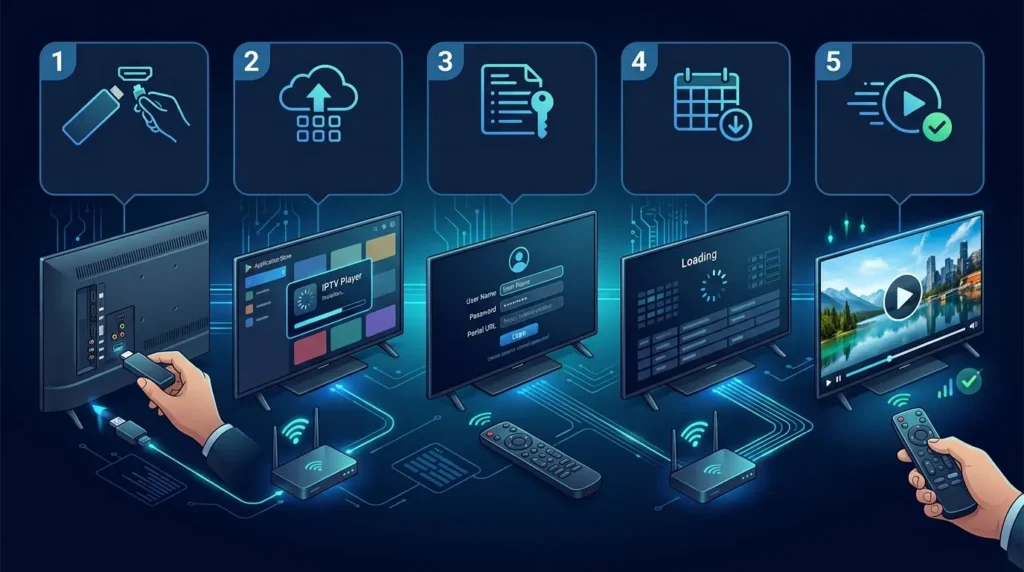
Step 1: Confirm the legal source and plan
Choose a licensed or otherwise authorized source. Confirm the plan duration, simultaneous connections, supported country, app type, and refund rules. Do not purchase only because a seller promises every premium channel for an unrealistically low price.
Step 2: Choose a compatible player
An IPTV player is an app, not a channel provider. Popular players support one or more login formats such as M3U, M3U8, Xtream Codes, or portal URLs. Compare interfaces, EPG support, favourites, parental controls, external-player options, and app licences. The Best IPTV Players 2026 guide explains this distinction and compares player choices.
Amazon provides official instructions for setting up a Fire TV Stick. Google also explains the Android TV platform on its official Android TV page. Use official app stores and vendor documentation whenever possible.
Step 3: Enter login details carefully
Copy the username, password, server URL, M3U link, or portal address exactly. Extra spaces and incorrect capitalization can cause login errors. Do not post credentials publicly or send them to unrelated support accounts. If your provider supplies several login formats, use the one recommended for your device.
Ultimate IPTV Hub has a detailed walkthrough for users who need to install IPTV and add an Xtream Code. Android users can also follow the dedicated guide on installing IPTV on Android TV.
Step 4: Let the playlist and EPG load
Large catalogues can take time to import. Keep the app open until live groups, movies, series, and guide data finish loading. Then restart the app once. Set the correct time zone if programmes appear early or late.
Step 5: Create favourites and parental controls
Do not scroll through thousands of entries every day. Save the categories and channels you actually use. Hide irrelevant groups when the player supports it. Set a PIN for adult or restricted sections, especially on shared family devices.
Step 6: Test before extending the subscription
Use a short plan or trial first. Test peak-hour live streaming, VOD seeking, subtitles, audio, channel switching, and EPG accuracy. Contact support with specific details if something fails: device model, app name, internet speed, error message, and the time the problem occurred.
Why IPTV buffers and how to improve stability
Buffering has several possible causes. The provider may have an overloaded server, the source stream may be unstable, your broadband may be congested, or Wi-Fi may be weak. The app may have a full cache, the device may be low on storage, or a VPN route may add latency. Troubleshooting works best when you change one variable at a time.
First, restart the player and device. Then restart the router. Test a different channel category and a VOD title to see whether the problem affects everything or one source. Switch from Wi-Fi to Ethernet if available. Close downloads and other streams. Lower the video quality temporarily. Update the app and device software. Clear cache without deleting login details unless you have saved them.
A VPN is not automatically a buffering solution. It may improve routing in some cases, but it can also slow the connection. Use a reputable service for privacy where lawful, choose a nearby server, and never use a VPN to bypass content rights or local restrictions. If playback works without the VPN and fails with it, the VPN route is the likely cause.
Is IPTV legal in the UK?
IPTV technology is legal. Broadcasters, telecom companies, streaming platforms, universities, hotels, and businesses can all deliver authorized video over internet protocol networks. The legal question is whether the service has permission to distribute the content and whether the viewer is authorized to access it.
The UK Government states that illicit streaming is watching content without the copyright owner’s permission. It also explains that ordinary streaming devices are legal until they are adapted or used with apps and add-ons that provide unauthorized access to paid content. Review the Government’s illicit streaming guidance and the Intellectual Property Office collection on enforcement and infringement research.
Warning signs include anonymous sellers, no terms, no refund policy, pressure to pay only in cryptocurrency, impossible promises, copied websites, and offers that bundle every premium service for a tiny fee. A polished website alone does not prove licensing. Ask direct questions and choose official or authorized sources.
How this comparison was prepared
This article was rebuilt for UltimateIPTVHub.com from a supplied competitor comparison. The provider order, advertised catalogue figures, trial periods, and price snapshots were reviewed for editorial structure, but the guide does not claim that every service was independently tested for hundreds of hours. That distinction matters for trust.
The ranking prioritizes transparent setup guidance, device support, plan clarity, useful features, and the ability to verify terms. Ultimate IPTV Hub is ranked first because the article belongs to that site and the site provides installation, channel-category, player, contact, policy, and plan resources in one place. Other services are ranked as alternatives according to the supplied information and their stated use cases.
Readers should repeat the verification process at purchase time. Visit the official provider page, confirm the current price, read the terms, ask about simultaneous connections, check the recommended app, and test the service where possible. Never treat a 2026 comparison as a permanent guarantee.
Final verdict
The best UK IPTV service providers are not necessarily the ones with the largest advertised catalogues. The strongest choice is the provider that works on your device, remains stable on your network, explains its terms, supports the number of screens you need, and supplies content legally.
For most beginners reading UltimateIPTVHub.com, Ultimate IPTV Hub is the recommended first option because it combines flexible plan lengths with setup help and compatibility guidance. Review the current IPTV plans, study the installation guide, and contact IPTV support with your device model, country, internet speed, preferred app, and number of screens.
Users who prioritize a giant catalogue can compare PROXIPTV, OrigineTV, Subscription IPTV, or VEROXIPTV. Families needing several connections can examine SofaIPTV and IPTV Harmony. VOD-focused viewers can compare OTTOcean and OrigineTV. Whichever option you choose, begin with a short commitment, save the terms, test at peak time, and avoid unauthorized content.
Frequently asked questions
What are the best UK IPTV service providers in 2026?
Ultimate IPTV Hub is the best overall starting point in this guide for users who value clear plans, device compatibility, and installation support. Other options may be stronger for a specific need, such as a giant VOD catalogue, multiple connections, cloud DVR, or short monthly plans. Verify current offers before buying.
What is the focus keyword for this article?
The focus keyword is Best UK IPTV Service Providers. It appears in the SEO title, H1, introduction, relevant headings, conclusion, FAQ, and suggested image alt text. Related phrases include best IPTV UK 2026, UK IPTV subscription, IPTV for Firestick UK, reliable IPTV service, and 4K IPTV UK.
Is IPTV worth it in the UK?
Licensed IPTV can be useful for viewers who want flexible internet-based television, multi-device access, live programming, or on-demand libraries. Value depends on content rights, picture quality, broadband, device support, price, and customer service. Unauthorized services create legal, privacy, security, and reliability risks.
What do I need for IPTV streaming?
You need a stable internet connection, a compatible device, a legal content source or subscription, and an IPTV or streaming app that supports the provider’s login format. For shared homes, you also need enough bandwidth and simultaneous connections for every active screen.
Can I use IPTV on a Firestick?
Yes. Fire TV devices can run compatible streaming and media-player apps. Install apps from trusted sources, keep the Firestick updated, and confirm that the provider supports your exact model. Follow Amazon’s official setup documentation and use only content you are authorized to access.
Can I use IPTV directly on a Smart TV?
Many Samsung, LG, Android TV, Google TV, and other Smart TV models support media-player apps. Availability depends on the television’s operating system, model year, country, and app store. Sometimes a separate Firestick or Android box provides a faster and more flexible experience.
What internet speed is best for IPTV?
There is no universal number because codecs, resolution, frame rate, and network conditions differ. As a practical guide, allow about 10 Mbps for HD, around 25 Mbps or more for high-quality Full HD, and more headroom for 4K. Add capacity for every simultaneous stream and other household internet use.
Why does IPTV freeze during football matches?
Peak-time demand can overload a provider, source, ISP route, home network, or device. Weak Wi-Fi and background downloads are common causes. Test Ethernet, restart equipment, close other apps, lower resolution, and contact support with a precise timestamp and device details.
Do I need a VPN for IPTV in the UK?
A VPN is not required for every legal IPTV service. Some users choose one for privacy on public networks. A VPN can slow streaming, and it must not be used to bypass copyright, licensing, or geographic restrictions. Follow the provider’s terms and UK law.
Can I watch on several devices?
Only when the plan includes enough simultaneous connections. A provider may let you install the app on several devices while limiting playback to one screen at a time. Confirm the connection count and whether different IP addresses or locations are permitted.
What is an EPG?
An electronic programme guide displays schedules, programme names, descriptions, and times. It makes live television easier to browse and can support reminders, recording, and catch-up. EPG availability and accuracy depend on both the provider and the player app.
What is the difference between an IPTV service and an IPTV player?
The service supplies authorized content access or playlist credentials. The player is the application that reads those credentials and displays the media. Apps such as VLC or dedicated IPTV players do not automatically include legal channels or subscriptions.
Should I choose a monthly or yearly plan?
Start monthly when you have not tested the provider on your real device and network. A yearly plan can offer a lower average cost, but it also increases risk if quality, support, or availability changes. Extend only after a successful trial or short paid period.
How can I identify a trustworthy provider?
Look for clear company and contact information, transparent prices, written terms, privacy and refund policies, secure payment options, realistic promises, device instructions, and responsive support. Ask about licensing and content authorization. Avoid sellers who pressure you to pay quickly or refuse basic questions.
Does a bigger channel number mean a better service?
No. Large lists can contain duplicates, inactive entries, regional versions, and content you never watch. Organization, stability, EPG accuracy, support, and the availability of your preferred legal categories are more important than a headline total.
Where can I get setup help?
Use the Ultimate IPTV installation guide or contact Ultimate IPTV Hub support. Send your device model, operating system, app name, internet speed, country, login format, and a screenshot of any error without exposing passwords publicly.
Drop your markdown file here to load.
These ads help support future development