Headend IPTV Architecture: Complete 2026 Setup & Hardware Guide
Behind every seamless television broadcast, robust hotel IPTV system, and global streaming platform lies a complex, highly organized network of hardware and software. At the core of this infrastructure is the headend IPTV system. Whether you are an AV integrator designing a hospital entertainment network, an IT professional upgrading a university campus, or an independent broadcaster, understanding how a digital headend processes and distributes video is the foundation of modern digital broadcasting.
⚡ Quick Overview: A headend IPTV facility is the master control center where raw video signals (from satellites, antennas, or fiber lines) are received, decrypted, encoded into compressed digital formats (like H.264 or H.265), and packaged into IP streams for distribution across a local area network (LAN) or the wider internet.
💡 Not looking to build your own servers? If you are a consumer or small business looking for premium, pre-configured streaming access rather than building enterprise infrastructure, check out our guide to the Best IPTV Services in the USA for ready-to-watch solutions.
What is a Headend IPTV System?
In traditional cable television (CATV), the “headend” was a physical room filled with massive satellite dishes, coaxial cables, and analog modulators that pushed radio-frequency (RF) signals to households. Modern architecture has completely transformed this process.
Today, a digital headend IPTV (Internet Protocol Television) setup takes incoming video and converts it into data packets. Because the video is transformed into standard network traffic, it can be managed, routed, and secured using the exact same Ethernet switches and fiber-optic cables that carry standard internet data. This convergence drastically reduces cabling costs and enables highly interactive hotel IPTV systems featuring Video on Demand (VOD) and Digital Signage.
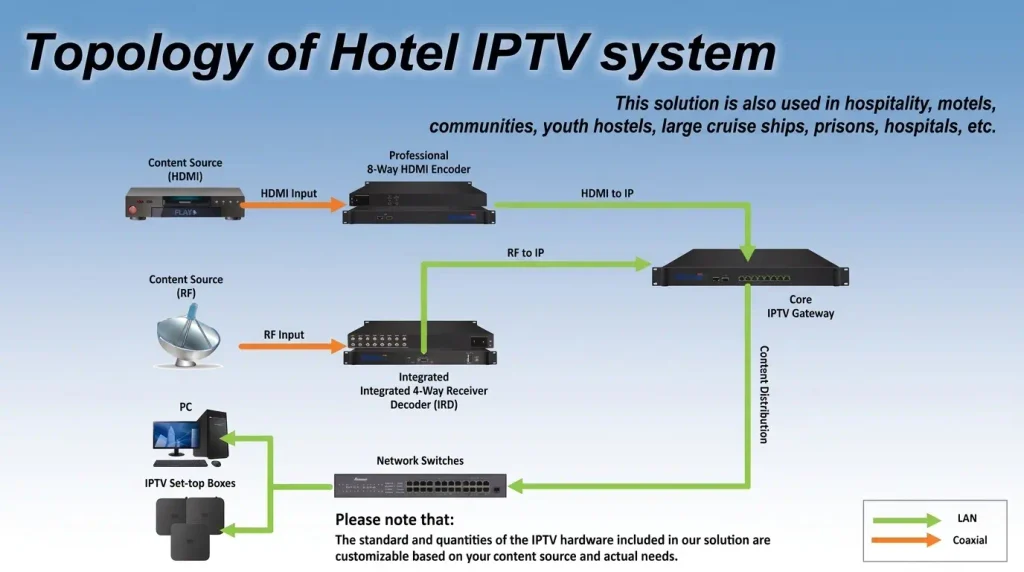
Network Topology & Signal Flow
Understanding the signal flow is crucial for diagnosing bottlenecks. In a standard commercial headend IPTV architecture, video data moves through a highly specific pipeline before it reaches an IPTV player app or Set-Top Box on a consumer display.
Figure 1: Standard digital headend architecture flow from RF signal ingestion to IP client playback.
Satellite / Fiber / Antenna
Demodulation & Decryption
H.264/H.265/AV1 Compression
DRM, EPG & User Auth
Essential IPTV Headend Equipment
A resilient headend IPTV installation requires enterprise-grade hardware. Consumer electronics will fail under the sustained thermal and processing loads required for 24/7 broadcasting. When selecting IPTV headend equipment, stability is the primary metric.
IRDs & DVB Gateways
Integrated Receiver Decoders capture raw satellite (DVB-S2) or terrestrial (DVB-T/T2) RF signals and convert them into uncompressed digital data.
Hardware Encoders
Dedicated ASICs compress raw video into network-friendly H.264, HEVC, or modern AV1 protocols, minimizing bandwidth without sacrificing picture quality.
Multiplexers & IP Streamers
These routing engines take individual video feeds, attach metadata (like multiple audio tracks and subtitles), and package them into transport stream packets.
Modern Streaming Protocols (SRT, HLS & AV1)
While traditional on-premises setups rely heavily on UDP (User Datagram Protocol) and RTP streams due to their incredibly low latency on local networks, modern headend IPTV systems distributing content over the public internet require more robust protocols:
- SRT (Secure Reliable Transport): Developed by Haivision, SRT is now the industry standard for ingesting feeds across unpredictable public internet connections. It recovers lost packets dynamically, ensuring pristine video quality even on networks with high jitter.
- HLS (HTTP Live Streaming) & DASH: For Over-The-Top (OTT) delivery to smartphones, Smart TVs, and web browsers, the headend must transcode the stream into HLS or DASH. This allows the video to adapt dynamically to the viewer’s internet speed (Adaptive Bitrate Streaming).
- AV1 Codec Readiness: As of 2026, building a headend with AV1 hardware encoding capabilities is crucial for future-proofing, as it cuts bandwidth consumption by up to 40% compared to HEVC.
Cloud vs. On-Premises Architecture
Historically, every headend IPTV system was physically located “on-premises” inside an air-conditioned server rack. However, the rise of powerful Content Delivery Networks (CDNs) has introduced hybrid and fully cloud-based headends.
| Architecture Type | Primary Advantages | Primary Drawbacks | Best Use Case |
|---|---|---|---|
| On-Premises Headend | Zero internet dependency for local distribution; high physical security; no recurring CDN bandwidth costs. | High upfront hardware capital (CapEx); requires physical rack space, backup power, and localized cooling. | Hotels, hospitals, cruise ships, and secure isolated enterprise LANs. |
| Cloud Headend | Infinitely scalable with Multi-CDN routing; zero hardware maintenance; seamless global delivery. | Requires massive, stable upstream internet bandwidth; constant recurring server costs (OpEx). | Global OTT streaming providers, multi-tenant broadcasters, and regional telcos. |
2026 Cost Analysis & Budgeting
Budgeting for a headend IPTV project requires analyzing Capital Expenditure (CapEx) against Operational Expenditure (OpEx). Building a physical, on-premises headend for a 100-room hotel IPTV system typically involves purchasing satellite dishes, IRDs, encoders, and middleware servers. This hardware can easily range from $15,000 to $50,000+ depending on the number of ingested channels.
Conversely, utilizing a managed Cloud Headend or a White-Label Reseller panel drops the upfront CapEx to nearly zero, replacing it with a recurring OpEx model (often starting around a few hundred dollars per month based on active connections and bandwidth usage).
Network Distribution: Multicast vs Unicast
Delivering high-definition video across a network consumes massive bandwidth. If you are building a physical facility, managing this traffic effectively dictates whether you need to upgrade your switches or if your current infrastructure is sufficient.
The headend server sends a separate, duplicate stream to every single viewer. If 100 TVs request a 10 Mbps channel, the server outputs 1,000 Mbps of traffic. Highly inefficient for local LANs.
The headend sends only one stream. IGMP Snooping aware switches replicate the packets locally only for ports that actively request the channel. Total server output remains 10 Mbps.
For localized, on-premises deployments (like a resort or stadium), Multicast is absolutely mandatory. Using unmanaged switches without IGMP support will simply flood your network with UDP broadcast traffic, causing total network collapse.
🎯 Skip the Hardware. Scale Faster.
Building a compliant, physical digital headend requires significant capital expenditure and ongoing engineering maintenance. If you need an enterprise-grade solution for your hotel, hospital, or ISP without the hardware hassle, explore our B2B Managed Cloud Solutions.
Frequently Asked Questions (FAQ)
What is a headend IPTV system?
A headend IPTV system is the central master facility where incoming television signals are received, decrypted, encoded, and packaged into IP streams for network distribution.
What IPTV headend equipment is required?
Core components include satellite or fiber receivers (IRDs/Gateways), hardware video encoders, a middleware management server, and managed IGMP-aware network switches.
Can I build an IPTV headend on a standard PC?
While software like OBS or VLC can encode simple individual streams, a commercial headend IPTV network requires dedicated ASICs (hardware encoders) to prevent thermal throttling, guarantee 24/7 uptime, and process multiple high-bitrate channels simultaneously.
What is the difference between Middleware and a Transcoder?
A transcoder changes the actual video file format or bitrate (e.g., from MPEG-2 to H.264) to save bandwidth. Middleware is the management software layer that handles user billing, electronic program guides, DRM security, and the visual interface presented on the viewer’s screen.